Friday, October 07, 2005

A nice Photoshop tip about the use of Vector Masking

By Jake Redekop

Vector Masking allows one to hide parts of a layer.

Duplicate your image (right click and choose ‘Duplicate Layer’). Now, create a new layer by clicking the ‘Create New Layer’ icon located at the bottom of the layers palette. Fill this new layer with white using the Fill Tool (shortcut: 'g') and move it down one position on your layers palette. Select the top layer (your image) and apply a vector mask to it by clicking this icon: also located at the bottom of the layers palette.

While the vector mask is enabled, anything painted black will be hidden, revealing whatever is behind the layer (in our case, a white canvas) and anything painted white will be visible.

Click on the vector mask and select the brush tool (shortcut: 'b'). Now, with black selected as your foreground color, start painting on areas of the image that you wish to hide. As you do this, you will reveal the white canvas from the layer immediately below your image layer. If you accidentally hide a portion of the image, switch your brush color to white and paint over the mistake. To quickly swap the colors in your swatch, hit the 'x' key. This makes correcting mistakes quick and easy.

Some helpful tips and shortcuts: magnify the image with the Zoom Tool (shortcut 'z') for more precision. While zoomed, press and hold the space bar and left mouse button, and move your mouse to move to other areas of the canvas quickly. Use the '[' and ']' keys to increase or decrease your brush size so as to make getting in those tight spots easier.

Tip: Try using a brush with 50% hardness to smooth any unnaturally rough or discolored edges of your subject caused by the masking process.

Using CSS to create linked "buttons"

I thought this was an interesting tip that I received from Bravenet today:

If you want to take things a step further, you can style your anchor tag to have a width and a height and a background color. This will, in effect, make it look like a button. Add the following to the style tag in your "head" tag:

a {width: 90px; height: 25px; background-color: #fff0df; border: 1px solid #666666; text-align: center; padding-top: 4px;}

Usually, I simply insert a graphic to represent a button but this will create the same effect without going through the trouble of creating the graphic.

Thursday, October 06, 2005

Is Brightcove a video version of Flickr?

"As with his earlier ventures, Jeremy Allaire intends to shake up an industry - this time, the world of television - by allowing all types of video producers, from media giants to anyone who has a camcorder, put their work on the Internet and make money if anyone watches it.

Set in an office building at the Massachusetts Institute of Technology, Brightcove will offer three interrelated online services. It has tools that let television producers load their video onto its servers, arrange them into programs and display them to Internet users. It will help producers charge fees for their video, if they choose, or sell advertising on their behalf to insert into the programs. And it will broker deals between video creators and Web sites that want to display the video, arranging for the profits from such arrangements to be split any number of ways.

Allaire, [the original developer of Cold Fusion, a product eventually purchased by Macromedia], became Macromedia's chief technical officer and helped oversee the development of Flash, which originally was to add animation to Web sites. His work with Flash video persuaded him to start a company devoted to Net video. So Brightcove's business model does not charge video producers anything to upload their video or to create special Web pages. Instead, he hopes to make money mainly by taking a cut of the advertising revenue and fees the videos generate. (If a producer wants to distribute video with neither ads nor fees, Brightcove will charge them in proportion to how much video users watch.)"

This service sounds similar to the still image sharing service Flickr, recently purchased by Yahoo. If Allaire adds similar features to the service, such as producing clips of various sizes automatically, keyword tagging, grouping, and automatic copyright management through Creative Commons, it could have excellent potential as a source of subject searchable learning objects.

Friday, September 30, 2005

Using Minitripod for camera grip provides stability for low-light images

While I was in Pennsylvania last week I tried my brother's suggestion of using the minitripod that came with my Panasonic FZ20 digital camera as a camera grip when I was photographing exhibits in low light conditions at the University of Pennsylvania Museum of Archaeology and Anthropology. I combined this technique with a remote shutter control.

I was quite pleased with the results, capturing images of dark objects (sculpted metal and wood) in a low light environment that I would not have been able to get with a shutter speed priority setting minimum of 1/30th of a second. The accessories in combination with the anti-shake technology built into the camera enabled me to capture well exposed images at a shutter speed of less than 1/15th of a second.

I'll get another chance to experiment with this technique when I visit the Chicago Field Museum in November to see the Pompeii: Stories from an Eruption. exhibit.

Friday, August 12, 2005

Evaluating Timeline programs and producing a Timeline with Filemaker Pro 7

This week I have been evaluating programs that can produce a Timeline. Although I have the Timeliner 5.0 program from Tom Snyder that lets you export a Timeline in HTML, I really wanted the ability to collaborate with colleagues at other locations on a Timeline site so I wanted a program that enables you to not only interactively view a Timeline but add Timeline entries from the web. Most of the online interactive Timelines I found were developed with a combination of PhP, MySQL, and Flash (to provide the graphic animation).

I even discovered that our own New Media Center had developed such a Timeline for one of the campus history courses. However, being a Filemaker Developer, it dawned on me that I could probably produce a Timeline program using Filemaker Pro 7 since it essentially provides the same capabilities as Php and MySQL and the new flexible relationship features of Filemaker Pro 7 coupled with its powerful scripting features and multimedia container fields could probably produce enough graphic complexity to avoid the introduction of a Flash component.

I also wanted the ability to provide a tool that could be used by Faculty to easily produce comparative Timelines and Timelines that could include entries grouped in different ways. So I sketched out a scheme that relates a Timeline definition table to a Timeline entries table. I also related a Timeline Entry Media table to the Entries table.

The Timeline Definition record includes a start and stop date and year, a container field for a banner image, a category field that is a muti-key field, and calculated time increment fields based on elapsed time from the start date or year. Using the start year field you can also define calculated fields for decade and century.

The Entry record includes the Entry Type (person or event - I will colorcode events by type), Title (name for a person), Description, Representative Image, Date, Year, a multikey Category field, a multikey Comparator category field, Select Image, Select Audio, Select Video (used for linking to the Media table), and the Entry ID (Key field for relationship to Media table). Using the Date field you can also define calculated fields for month, year, decade, and century.

The Media Table has the fields Entry ID, Media Type, and a container field to contain the media object.

By relating the Timeline Definition start year (or decade or century) field to the entry record event year, decade, or century calculations using the <= operator then relating the stop year (or decade or century) to the entry record event year, decade, or century calculations using the >= operator, you can produce a display of all events recorded in the entry table that fall between the two dates. By adding a relationship by category, you can filter the events displayed. For example, if the outline definition category field includes the values New York, United States, or North America and you relate it to the category field of the entry records in the Entry table, only events in New York or the United States or North America will display in the Timeline. If you want only events in New York, you place the single value New York in the Timeline Definition category field. If you want to compare a timeline of events in New York with events in the United States, you define a relationship between the Timeline Defintion field Comparator with the Entry category field. Then design a layout that displays the entries from the first relationship above a timeline displaying entries from the second relationship.

Vertical timelines can be produced easily by designing a layout in list view with fields placed in a single column. A horizontal timeline is produced by using the calculated Time increment fields spaced along a demarcated line then linking the Time increment fields to the Entry table with the >= and <= operators and defining portals that refer to these relationships.

If you're interested in looking at my prototype, it is available for download at:

http://interact.uoregon.edu/techweb/Timeline.fp7

Thursday, July 28, 2005

Blend it like Beckham

I received this Photoshop tip in my Bravenet Webmaster Tips and Tricks newsletter and thought it was really good. I had never tried using the Blend mode options before.


by Jake Redekop


"Layer blend modes are a powerful, but often overlooked, feature of Photoshop. This month we're going to use layer blend modes to correct under or over exposures in your digital photograph collection.

We'll begin with overexposures. The first thing you need to do is duplicate the layer that holds your overexposed photograph. To do this, right click on the layer and chose “Duplicate Layer” from the drop down menu.

You should now have two instances of your photograph. Choose the topmost layer and switch the blending mode to 'Multiply' (located at the top of the layers palette). If you like you results, you are done!

If your photo is still a little light, keep duplicating the topmost layer until you are satisfied; however, if the picture is too dark now, lower the opacity of the top layer until you get the desired color saturation. For the image below, I used two duplicates with the second duplicate set to 15% opacity.


To correct underexposed photographs, follow the same steps as above except use the "Screen" Blend Mode to brighten the image."

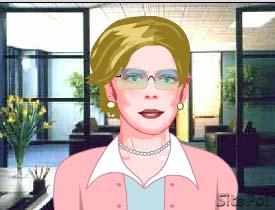
Site Pal offers highly configurable virtual agents


A little spendy but very interesting technology.

Here's the character I created.

I dressed her conservatively (more like me) but there are a number of clothing options including uniforms for all the main branches of the military, civilian uniformed occupations, sports, etc. I found a pair of glasses similar to mine and colored her hair (there wasn't a graying option though). I aged her some to get the lines in the neck, widened her face and her shoulders , changed the color of her eyes and added eye makeup. I notice there is a facial features option but it is not available in the demo. Hat choices is also grayed out. The background choices are a bit on the boring side but you can upload your own.

I see their gold package includes an AI engine for answering questions. I tried out the Text-to-Speech feature (available in the Silver and Gold editions) and it is very natural sounding. All the controls are very intuitive and the result is quite impressive. I see you can even hire "professional" voice talent for only $50 per minute!

http://www.oddcast.com/sitepal2/?&affId=16968

Monday, May 09, 2005

Internet Phones Arrive at Home (and Some Need No Computer)

The New York Times: "A few years ago, a buzz began spreading about Internet telephony, a technology allowing telephone conversations to be made across the Internet rather than exclusively over regular phone lines.

More recently, Internet phone technology - also known as voice over Internet protocol, or VoIP - made inroads into businesses using heavy-duty equipment from companies like Cisco.

Now, thanks to providers like Vonage and others, it has found its way into the home. The service is sometimes choppy, but costs are low and quality is satisfactory for routine calls. Moreover, Internet protocol lends itself to inexpensive videoconferencing as well, useful for informal video chats between friends or business associates.

An example of a videoconferencing option that requires no computer is the Broadband Video Phone from Packet8 (www.8x8.com). At $99, this may be the best overall choice for VoIP enthusiasts; it offers fully functional video and audio calling at low cost.

The device looks much like an office phone but has a pop-up screen and can also be hooked up to a television. Its video quality is good but not great - flawless at times, but capable of quickly degrading, especially if either party moves quickly.

As a phone, though, it sparkles. It is hard to tell it is not a regular land line, and that factor separates the device from its peers. Also attractive is its ease of setup: plug in an Ethernet cable and you're all set. Service for the device runs $19.95 a month for unlimited video calls and unlimited voice calls in the United States and Canada."

I'm very pleased to see this technology finally coming into its own. I tried VOIP a number of years ago in its infancy and it turned out quite helpful to a friend who lost his father and was able to call back and forth to the Midwest several times a day to help his mother with funeral arrangements and afterward as she adjusted to living alone.

Wednesday, April 20, 2005

Using Shutter Speed Priority Setting with Panasonic FZ20 the answer to nonflash interior photography

In my second major outing with the Panasonic FZ20 digital camera I obtained much better results indoors where flash was prohibited and low lighting was a significant issue. I was attending the Historical Novel Society conference in Salt Lake City and visited the University of Utah Museum of Fine Art. I set the ISO sensitivity to 400 and used the Shutter Speed priority setting with a speed of 1/30 second. I was then able to get adequately-exposed sharp images thanks to the built-in digital stabilization system in the camera. Although there is increased noise in the images because of the high sensitivity setting, the pictures were still quite acceptable.

I wish I had used this setting more often in Rome. Most museums, both here and in Italy, do not permit the use of tripods (or flash). Even the digital stabilization system cannot compensate enough if the Automatic Program setting drops the shutter speed to less than 1/30 second. Without a tripod this makes it almost impossible, especially with a person like me with familial tremor, to get a sharp image.

I hope to return to Italy in 2008 and reshoot some of the darker exhibits in the Capitoline, National, and Vatican Museums. I also hope to spend several days in Florence next time so I can get a reservation for the Uffitzi Gallery, get an opportunity to photograph the exhibits at the Museum of Roman Civilization in Fermi, and the displays in the Archaeological Museum of Naples.

In the meantime I plan to attend the King Tut exhibition in Los Angeles and visit the Getty Museum while I am there as well. I want to experiment a little with the stabilizer mode setting. According to the article I have link referenced the Mode 2 setting (not the default) will actually produce a sharper image:

"When the "mode 1" setting is used, the stabilizer is always running, which helps you compose your photo. Mode 2 only activates the stabilizer when the picture is actually taken, which actually does a better job of eliminating camera shake."

I also want to experiment with the White Balance adjustment. I had problems in Rome using the present Program setting when shooting flash pictures of bronze figures. It resulted in them looking like a negative. Perhaps adjusting the white balance would resolve this problem.

Blogger upgrade troublesome

Ever since Blogger upgraded one of its central kernels a couple of weeks ago I have had repeated problems with publishing from the edit posts and compose posts screens. I've reported it twice but the problem seems to continue. It is getting really irritating. I tried to post something last week and it would just keep flashing 0% on the publishing progress screen and never seem to complete the publishing process. However, now that I have returned from a conference and checked the blog, it seemed to have actually published it somehow. Whether it did it without updating the progress screen or tech support forced it after receiving my trouble report I don't know but I hope they get all the kinks worked out soon. It's really annoying.

Friday, March 04, 2005

Flickr Appears to Be Target of Buyout Efforts

I noticed there was a discussion thread on the Flickr bulletin board that was speculating on the impact of a potential buyout from either Yahoo or Google. I love Flickr's ease of use and have over 2000 images posted to my professional Flickr account so of course any rumors about a buyout are a bit unnerving.

However, I must admit that Google's buyout of Blogger turned out to be quite positive. With Google's financial muscle, Blogger was able to go to a full featured totally free product and I have had no regrets about that merger. I don't know what Yahoo would have in mind. I think I would prefer a Google takeover, though, since I understand that Google collaborated on the search mechanism Flickr incorporated into the service and it would be a wonderful enhancement to Google's existing image search service.

Television Media and Computers offer Children Pluses and Minuses

Some interesting research from the National Science Foundation:
US NSF News"A consortium of researchers has reported that very young children’s interactions with TV and computers are a mixed bag of opportunities and cautions, while teenagers’ Internet use has changed so much that the myths of several years ago need to be debunked.

Said Amy Sussman, program manager for the National Science Foundation (NSF), which funds the five-site Children’s Digital Media Center (CDMC), "Reaping the benefits of various media while avoiding pitfalls is no easy task. Parents and policymakers need to inform their decisions about whether and how to guide their children’s media use through scientific knowledge. Different developmental stages call for different strategies. These and other research studies can help create needed guidance for children at all ages."

"Several individual studies support the 1999 recommendation by the American Academy of Pediatrics that parents do not expose children to electronic screens until they are 2 years old.

One important distinction is between “background TV” and “foreground TV” – that is, TV programs that are playing when young children are around (for example, because the TV is always on in the house) or TV programs designed for young children (for example, Teletubbies). Over a third of the households with children from birth to 6 years old had the TV on most or all of the time, in a study reported by Vandewater and colleagues. Children in these "heavy-television households" watched TV more and read less than other children. In addition, research summarized by Daniel R. Anderson and Tiffany A. Pempek indicates very little evidence that children younger than 2 years old learn much from even so-called "educational" programs and videos, and, furthermore, that background TV may be associated with poorer cognitive outcomes."

What happens when children become teenagers?

"Research findings reveal that teens’ Internet use focuses on identity, sexuality, social attitudes, and values – issues perennially associated with the teenage years. Online dangers include pervasive pornography and other sexually explicit material, disembodied strangers who may pursue others or express hate and racism, and rampant commercialism. However, teenagers also find information they may be hesitant to seek elsewhere, good communication channels with their friends, and advice and support."

Friday, February 25, 2005

Visions of Profit in Podcasting

I have been a big fan of Audible.com since becoming one of it's first customers several years ago. So, I was quite interested in reading about the company's plans to leverage podcasts with its download distribution system. Although I have never ordered any of Audible's periodical subscriptions, I have always thought it would be a great customer service if some of the magazines I subscribe to would offer an audio version that I could listen to on my commute since my attention is less divided then than at home where I am usually bustling about cleaning up the kitchen, taking care of my two puppies, tending my husband, trying to read the paper and catching the occasional remark on television.

The New York Times : "Last week, Audible.com, which in 1994 pioneered the idea of using the Internet to download audio books and other audio material to personal computers, said that it would soon join the podcasting movement. The company, whose business currently includes distributing popular radio programs like 'Car Talk' on a subscription basis over the Internet, now says it intends to make its software and distribution system available to people who want to produce their own podcasts.

'When I started Audible and we started signing up radio partners, people would ask me, 'where does your technology leave radio?,' ' said Donald Katz, Audible's chairman. 'Now it's clear that the creative capacity that is out there greatly outstrips the capacity of the radio pipeline.'"

Thursday, February 24, 2005

Sad, Lonely? For a Good Time, Call Vivienne*

The New York Times > Technology > Sad, Lonely? For a Good Time, Call Vivienne*: I see that Artificial Life, the company that produced the software I used to create virtual Caesar, has apparently abandoned their efforts to sell ridiculously priced virtual sales agents and have turned to development of "virtual" friends for lonely cell phone users.

One of the biggest problems they encountered in their original product line, in my opinion, was the amount of time and knowledge it takes to produce a custom virtual agent for a particular company with a specific focus. Now, they are concentrating on producing non-specific "friends" that can be programmed with generic "chit-chat" and used by a much larger pool of potential customers. I suppose this might be a more viable business model but sadly, like the shallow entertainment of "reality" television, it does little to explore the educational potential of their software.

"Eberhard Schoneburg, the chief executive of the software maker Artificial Life Inc. of Hong Kong, may have found the answer: a virtual girlfriend named Vivienne who goes wherever you go.

Vivienne likes to be taken to movies and bars. She loves to be given virtual flowers and chocolates, and she can translate six languages if you travel overseas. She never undresses, although she has some skimpy outfits for the gym, and is a tease who draws the line at anything beyond blowing kisses.

If you marry her in a virtual ceremony, you even end up with a virtual mother-in-law who really does call you in the middle of the night on your cellphone to ask where you are and whether you have been treating her daughter right.

She may sound like a mixed blessing, decidedly high maintenance and perhaps the last resort of losers. But she is nonetheless a concept that cellphone system operators and handset manufacturers are starting to embrace.

Vivienne, the product of computerized voice synthesis, streaming video and text messages, is meant not only to bring business to Artificial Life (she will be available for a monthly fee of $6, not including the airtime costs paid to cellphone operators or the price of virtual chocolates and flowers). But she is also meant to be a lure for the new, higher-tech, third generation, or 3G, cellphones."

Tuesday, February 22, 2005

Panasonic FZ20 offers challenging options to the digital photographer

In preparation for my upcoming trip to Italy, I have been studying up on the features of our new Panasonic FZ20 Luminix digital camera. I've taken a few shots with it but it seemed to require quite a bit more "fiddling" than my reliable Sony Mavica FD-81. Today, however, I think I identified some of the default settings that may have been causing me some trouble. I noticed that the Auto Focus Continuous setting was not set to on. This meant that there was a slight delay once I pressed the shutter before the camera began it's auto focus routine and may have resulted in some of my earlier images being a little fuzzy. I'm used to the Mavica being focussed almost instantly. I'm hoping that my setting this feature to on will help. I also noticed that the Auto Focus feature was set to only a single point even though the camera is capable of using a nine point focus system. In some of my earlier images, I noticed that the focus seemed less sharp as the image radiated out from the center. I thought it was a result of a shallow depth of field but this may not be the problem after all. I set this feature to the maximum of 9 point focus so we'll see how this affects the overall sharpness of the picture.

I also set the programmable Scene 1 setting to "Party" a setting for obtaining sharp focus in a low light condition. I set the programmable Scene 2 setting to "Scenery" for instant maximum depth of field and sharp focus. These are the majority of types of shots I think I will need.

I have also called our Museum of Art and requested permission to come over and photograph some of their ancient art objects in their exhibition setting so I can determine the best settings for focus and true color reproduction.

Thursday, February 10, 2005

Resurrecting a weblog

This weblog was began in September of 2003 using an open source weblog tool called Blosxom that was written in Perl. I really liked the modularity of blosxom and some of the plugins designed for it, especially utilities like the magic link plugin that would recognize a word from your links list and automatically link it to a URL specified in your link list file (Example: Apple would automatically link to http://www.apple.com). However, it became clear over the course of a year that the basic program lacked critical security features that prevented unfortunate events like spammers flooding a blog with advertising through the comments function and code that would prevent the output of an invalid RSS feed or cause internal server errors simply from the use of an international character or reference to a particularly long URL. Therefore, I decided to end my experiment with the tool.

However, I know there are a number of people interested in further development of Blosxom and I wanted to preserve my experiences with the program in the hope that they would prove useful to someone else. Therefore, I transferred all of my posts to this new Blogger blog and, using Blogger's date change utilities, modified the dates of my earlier posts to match the time frame they were actually posted.

I will now go forward with this blog posting my experiences with other technology tools and thoughts about tools in development. Hopefully, other technology enthusiasts will find them helpful as well.

Tuesday, July 27, 2004

Olivier makes comeback from beyond the grave

Another step towards virtual actors:

"Laurence Olivier is to make his Hollywood comeback alongside Jude Law and Gwyneth Paltrow in the sci-fi blockbuster Sky Captain and the World of Tomorrow. It will be the Oscar-winning actor's first screen role following an enforced 15-year lay-off. The lay-off began, understandably enough, with his death in 1989.

Thanks to the wonders of digital technology, Olivier will now be resurrected to "play" the role of a villainous overlord who commands an army of giant killer robots. The film will splice together old movie scenes and archive footage of the actor in his youth, although Olivier's classic clipped delivery will be voiced by another actor. Explaining the decision at the annual Comic-Con sci-fi convention in San Diego, Jude Law said that no living actor possesses the same gravitas and authority."

Thursday, July 22, 2004

Researchers attempt to develop software to authenticate digital photos

As a digital photographer myself, I was particularly interested in the methods being developed by researchers to authenticate digital images.

"It used to be that you had a photograph, and that was the end of it - that was truth," said Hany Farid, an associate professor of computer science at Dartmouth College who is a leader in the field. "We're trying to bring some of that back. To put some measure of guarantee back in photography."

Over the last three years, Professor Farid and his students have become experts at forgery, making hundreds of images that look authentic but have in fact been digitally tweaked. License plate numbers are changed. A single stool standing on a checkerboard floor is suddenly a pair of stools. Dents on a car are wiped away with a few mouse clicks.

The skillful tampering disturbed the images in ways that the human eye could not detect. But Professor Farid says his algorithms can spot them and sound the alarm.

Jessica Fridrich, a research professor in electrical and computer engineering at the State University of New York at Binghamton, is approaching the fraud problem from the other side. She is trying to figure out who took the digital picture in the first place.

Just like the rifling in a gun barrel leaves a distinctive pattern on the bullets it fires, a digital camera has a signature of sorts. Today's digital cameras have sensors with millions of pixels. In each camera, a small handful of these are either too bright or are burnt out entirely. When a camera takes a picture, the imperfections leave a unique pattern, Professor Fridrich has discovered in preliminary research.

Now, she is trying to embed a bit of the photographer in the picture, too. The patterns in the iris - the colored part of the eye - are at least as distinctive as a person's fingerprint. With money from the Air Force, Professor Fridrich is designing a camera that takes two pictures at once: one though the camera lens, and a smaller one of the photographe's iris. The iris image along with the time and place of the photo session would then be compressed, encrypted and instantly hidden within the larger picture just taken.

Thursday, January 29, 2004

The Tyranny of Copyright

''The notion that intellectual property rights should never expire, and works never enter the public domain -- this is the truly fanatical and unconstitutional position,'' says Jonathan Zittrain, a co-founder of the Berkman Center for Internet and Society at Harvard Law School, the intellectual hub of the Copy Left.

Thinkers like Lessig and Zittrain promote a vision of a world in which copyright law gives individual creators the exclusive right to profit from their intellectual property for a brief, limited period -- thus providing an incentive to create while still allowing successive generations of creators to draw freely on earlier ideas. They stress that borrowing and collaboration are essential components of all creation and caution against being seduced by the romantic myth of ''the author'': the lone garret-dwelling poet, creating masterpieces out of thin air. ''No one writes from nothing,'' says Yochai Benkler, a professor at Yale Law School. ''We all take the world as it is and use it, remix it.''

Monday, December 08, 2003

Game Companies Embrace Mod Builders

Since my son has described his efforts at modifying some of his favorite games, I was particularly interested in this article about game companies recognizing the market potential of "mod" builders.


"In recent years, players dedicated to modifying store-bought computer games have morphed into an underground movement - mod makers, as they often call themselves. Now they are showing signs of breaking into the mainstream as game developers are increasingly willing to give away the very software tools they use to construct the games, including them on the disc with the game itself."


"As a result, working alone or in teams, the mod makers are spending hundreds of hours tweaking or completely redrawing popular games to be played on their own terms. The payoff is fun and bragging rights, and just maybe a career in the multibillion-dollar electronic game industry."